


Your home's
digital memory.
Keep every receipt, warranty, repair, contractor, and maintenance reminder for your home in one place. Your records stay on your phone.
Records stay on your device for now. Optional cloud sync will be offered as a user choice in the future.
Everything links back to a property: appliances, contractor contacts, receipts, and past repairs.
Save an export file anywhere you choose, locked with an optional AES-256 passphrase only you know.
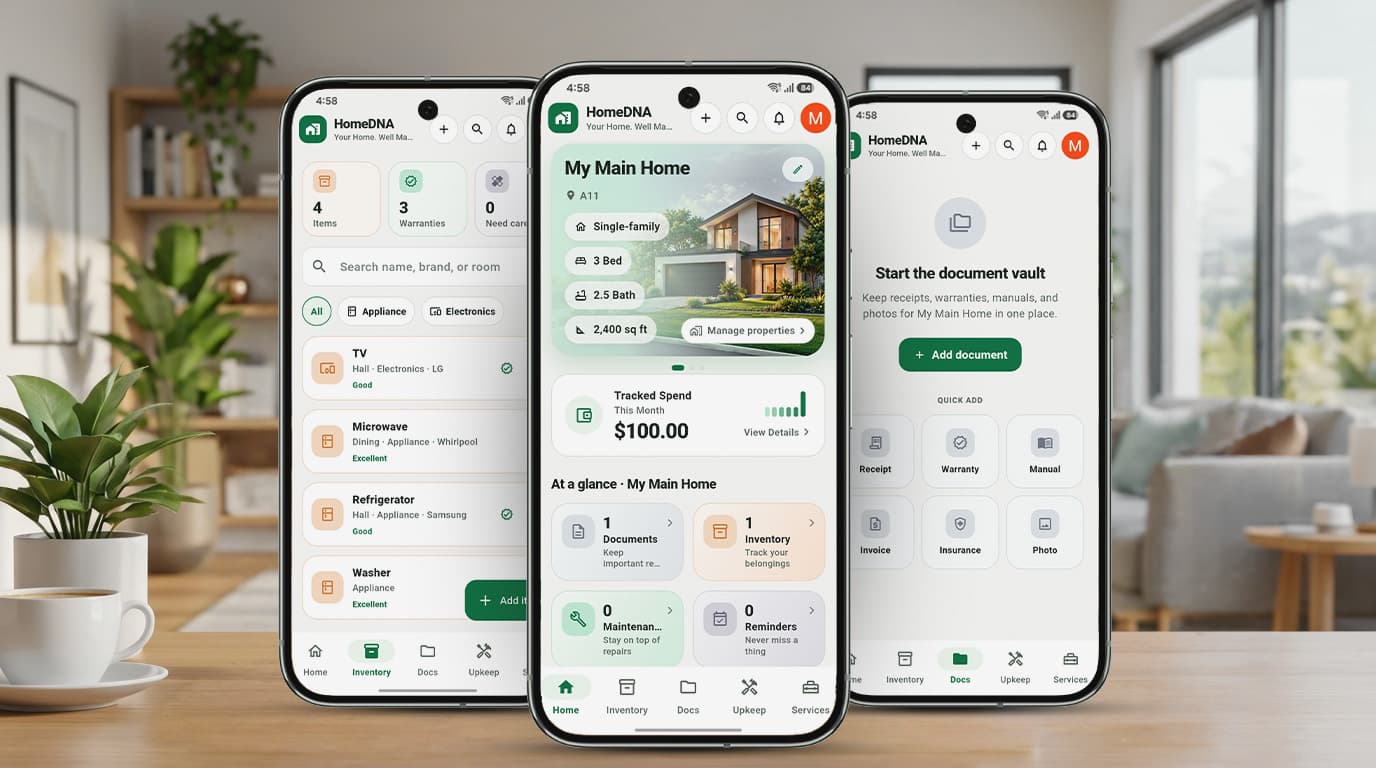
Home information is scattered until the stressful moment you need it.
An appliance breaks, an insurance claim opens, a warranty needs proof, or the house goes on the market. Each depends on records most people cannot find quickly.
Receipts disappear.
Purchase records live across email inboxes, paper shoeboxes, phone screenshots, and fragmented retailer portals. When an appliance fails within warranty, the receipt is lost.
Repairs lose context.
Invoices, repair photos, replacement part numbers, contractor notes, and warranty periods are rarely connected. You forget who installed what and what warranty you were promised.
Homes lack history.
When a property changes hands or a tenant moves out, years of expensive improvements, permits, and routine maintenance shrink to hazy memory.
See how HomeDNA keeps your home organized.
Five tightly integrated systems designed specifically for homeowner clarity and peace of mind.
Home Dashboard
Open the app and see what needs you today, how much you have spent, and what you own, for each property you manage.
- Switch between several homes, rentals, or apartments
- Tracked spend and upcoming tasks on one screen
- Rooms, photos, and notes for every property
Upkeep & Reminders
Set a task once and HomeDNA reminds you when it comes around again, so the dryer vent, smoke detectors, and gutters never slip.
- Monthly, 3 or 6 months, yearly, or custom days
- Reminders arrive as notifications on your phone
- Every completed task is kept in the home's history
Documents & Inventory
Attach a photo or PDF to the item it belongs to. When something breaks, the receipt, serial number, and warranty date are one tap away.
- Snap a receipt with the camera or attach a file
- Link each document to a room, appliance, or repair
- Search across everything from one box
Services & Vendors
Keep the plumber, electrician, and cleaner in one list, share their details in two taps, and see what each repair cost.
- One vendor can serve several properties
- Share contact cards by Message, Email, or WhatsApp
- Expenses stay tied to the property and the job
Encrypted Backups (AES-256)
Save a backup file to Files, iCloud Drive, Google Drive, or email. Add a passphrase and only that passphrase can open it. On a new phone, import the file and the records come back.
Built around the property, not loose files.
Start with a property, then connect inventory, documents, repairs, vendors, tasks, and expenses into one permanent home record.
Property Vault
The central core for multiple homes
Manage multiple single-family homes, vacation rentals, condos, or apartments from a single view. Store master property profiles, lot dimensions, square footage, WiFi access, and emergency shutoff locations.
Key Capabilities
3 Bed • 2.5 Bath • 2,400 sq ft
Total recorded spend: $14,850
3 upcoming maintenance items
Rental mode turns move-outs into a repeatable workflow.
Keep inspections, damage photos, vendors, repair estimates, and deposit notes together for every rental, so each turnover follows the same checklist without chaos.
Tenant: Sarah Jenkins • Lease End: Oct 31
Built for those who care about their properties.
Homeowners
Protect your family's largest financial investment. Locate critical appliance receipts, paint codes, contractor contacts, and roof warranty documents in seconds during an emergency or insurance claim.
Small Landlords
Keep each rental property's repairs, preferred plumbers, tenants, receipts, and deductible expenses strictly organized. Streamline tenant turnover and simplify end-of-year tax filing.
Short-Term Hosts
Track recurring turnover cleaning checklists, replacement supplies, furniture inventory, smart lock codes, and emergency repair vendor contacts for uninterrupted 5-star guest reviews.
Your home records stay on your phone.
HomeDNA keeps all properties, documents, and photos safely stored on your device with zero ads and zero tracking. While the app operates strictly local-first today, we will offer an optional cloud sync feature in future releases so users can seamlessly sync records across devices if they choose. Cloud sync will always be strictly opt-in, and we will always ask before anything ever leaves your device.
Records and attachments live on your phone in the app's private storage. You retain 100% control over your files.
An optional passphrase encrypts your exported backup file with military-grade AES-256 before you save it anywhere.
We will offer optional cloud sync in the future so users may choose to sync data across devices. Strictly opt-in with user consent.
We never sell personal information, and we do not operate analytics trackers or advertising scripts.
Policies, Terms & Account Control
HomeDNA is built on honesty and privacy. Explore our official legal policies and account management portals below.
Privacy Policy
Effective: October 22, 2026
Learn how HomeDNA protects your property data. Your home records stay on your device for now. Optional cloud sync will be offered in the future with full user consent.
Terms & Conditions
Effective: October 22, 2026
The agreement governing your use of HomeDNA mobile apps, the web app at /app/, and this website.
Delete Account
Google Play Deletion Portal
Instructions on how to immediately delete your HomeDNA account inside the mobile app, or request deletion by email within 30 days.
Support & Knowledge Base
Need assistance with backups, new phone migration, or account settings? We are here to help.
Include your phone model, HomeDNA app version, and description of your question.
Getting Started Quick Guides
Add Your Property
After signing in, give your home a name and address. Add rooms, appliances, and serial numbers. You can manage multiple homes anytime via “Manage properties”.
Snap Receipts & Warranties
Open Docs, take a photo of physical purchase slips or import PDF warranties. Link them directly to rooms, appliances, or contractors for instant search.
Schedule Upkeep Reminders
Open Upkeep, create tasks (HVAC filter, smoke alarms, gutters), and select repeat schedules (monthly, 90 days, yearly). Notifications ring on your phone.
Export Encrypted Backups
Go to Profile → Backup. Set an AES-256 passphrase and export your file to iCloud Drive or Google Drive. Backups ensure your data is always safe.
Frequently Asked Questions
Everything you enter into HomeDNA—properties, documents, photos, appliance serial numbers, receipts, and maintenance tasks—is saved directly on your phone in the app's secure private storage (or in your device's browser storage for the web version). We never upload your home records to our cloud servers.
Never lose another receipt, warranty, contractor, or repair record again.
Open the web app, sign in, and start your home's digital record today. Keep complete control of your data on your phone with zero advertising or tracking.